How to scrape any page on the web (even the ones that fight back)
In earlier posts I took apart how Exa, Keenable and Parallel search the web, and how PageLode reads Google results. All of them quietly assume the hard part is already solved: that you can actually read the pages they find.
That assumption broke for me the first time I tried to give an AI agent ten thousand websites to read.
That is the problem PageLode exists to solve. You give it a web address, or a list of thousands, and it hands back each page as clean, plain text. This post is the story of its core engine, told without the jargon.
By the end of this post you’ll know:
- Why “just download the page” fails so often
- Why PageLode always tries the cheapest thing first
- How it tells a real page from an empty shell or a bouncer
- What it does when a website asks “are you human?”
- How a cluttered web page becomes something an AI can read
1. The problem: the web doesn’t want to be read by machines
Picture an assistant whose whole job is to visit websites and photocopy the useful bit. Simple, until they actually start knocking on doors.
- Some doors just open. You ask for the page, you get the page. This is most of the web.
- Some rooms are empty until the lights come on. Lots of modern sites send an empty frame and build the page in your browser with JavaScript. Download it the simple way and you get a blank sheet that says “please enable JavaScript”.
- Some doors have a bouncer. Services like Cloudflare, DataDome and PerimeterX stand in front of a site and turn away anything that looks like a robot. That’s the “Just a moment…” screen you sometimes see.
- Some doors want a puzzle solved. The “click all the traffic lights” CAPTCHA.
And even when you get in, the page is covered in menus, cookie pop-ups, adverts and footers. An AI reading that wastes most of its attention on clutter.
The obvious fix is to send a real web browser to every page. It handles all of the above. It’s also slow, heavy and expensive. Opening ten thousand Chrome tabs to read mostly ordinary pages is like sending an armoured van to post a letter.
2. The big idea: cheapest step first
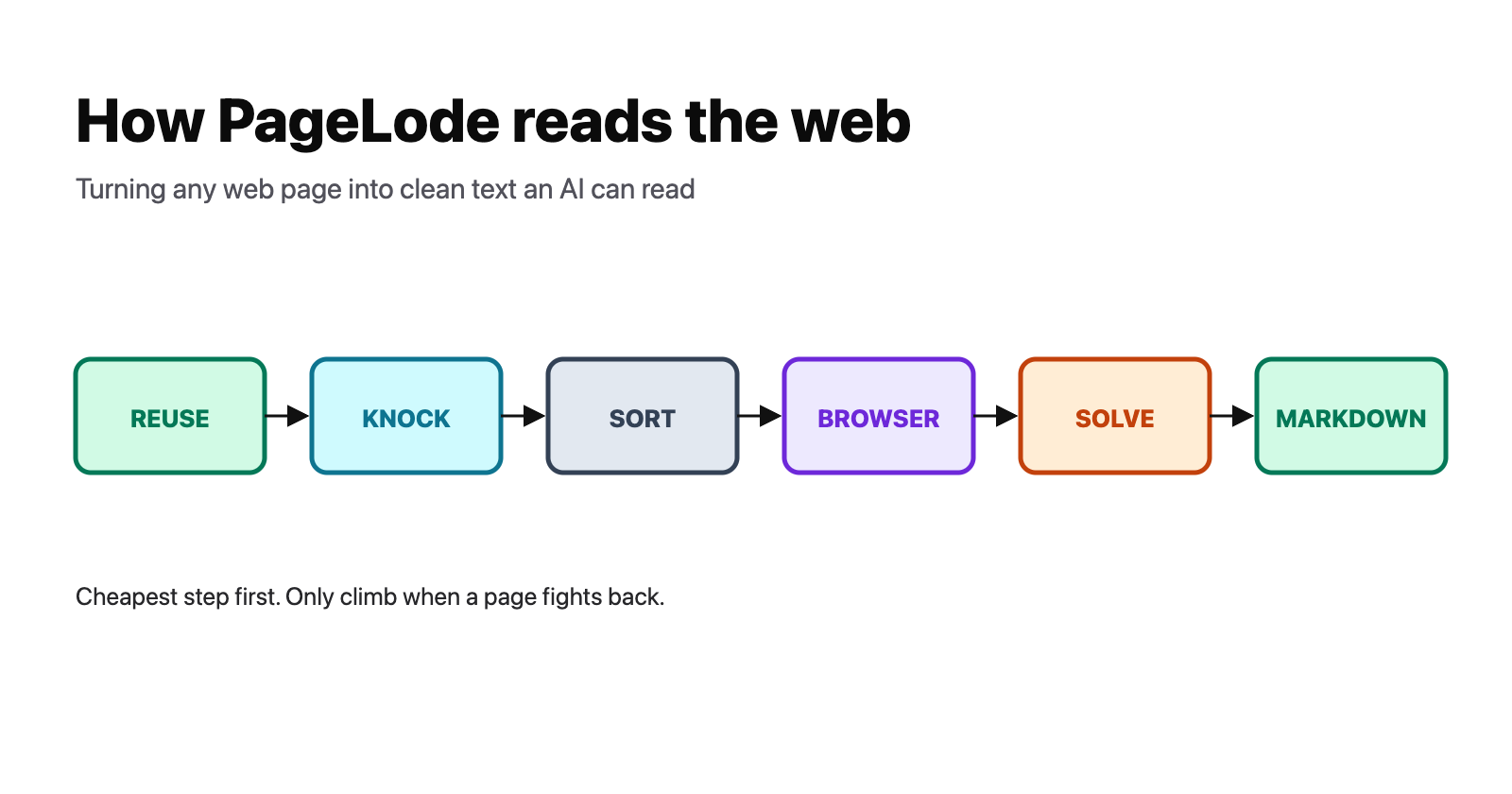
PageLode’s engine is a ladder. Every page starts at the bottom, and only climbs a rung if the rung below didn’t work.
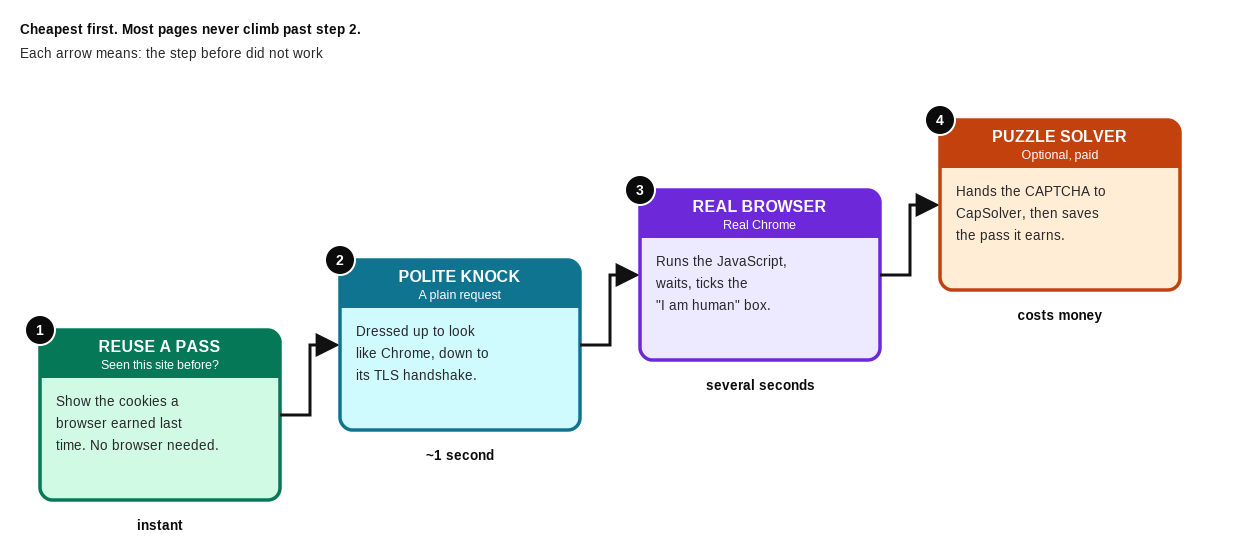
- Reuse a pass. Has a browser already got past this site’s bouncer recently? Then reuse the pass it earned.
- Polite knock. Ask for the page with a plain request, dressed up to look like Chrome.
- Real browser. Send an actual Chrome window to load the page properly.
- Puzzle solver. If a CAPTCHA is still in the way, pay a service to solve it.
Most pages never climb past step 2. That’s the whole trick: the expensive tools only get used on the pages that genuinely need them.
3. The polite knock (and why it wears a disguise)
The cheapest way to read a page is a plain web request: “please send me this page”. No browser, no images, no JavaScript. It takes about a second.
The catch is that bouncers check how you knock, not just what you ask for. Before any page is sent, your computer and the website do a quick secure handshake, and every piece of software does that handshake slightly differently. A normal programming tool’s handshake looks nothing like Chrome’s, so bouncers can spot it instantly.
So PageLode’s knock copies Chrome’s handshake exactly, along with the headers Chrome sends. To a bouncer looking at the door, it looks like an ordinary person in an ordinary browser.
That alone gets a surprising number of pages through without ever starting a browser.
4. The sorting desk: is this really the page?
Getting a reply doesn’t mean you got the page. A bouncer’s “Just a moment…” screen is a perfectly valid reply. So is an empty JavaScript shell.
So every reply goes to a sorting desk before anything else happens. It uses plain rules, not AI, so it’s fast and predictable.
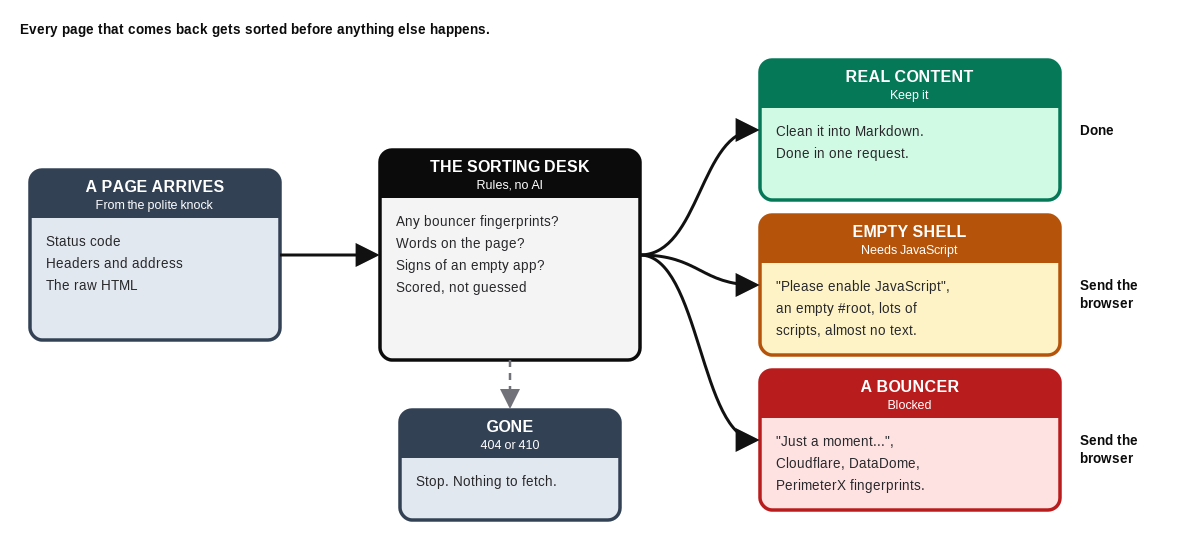
It looks for bouncer fingerprints. Every bot-protection service leaves recognisable traces: a “Just a moment” title, a captcha-delivery.com link for DataDome, a _pxAppId for PerimeterX, certain error codes. PageLode keeps a list of these fingerprints and checks every page against it.
It scores how empty the page is. No single clue proves a page is an empty shell, so each one adds points:
- A note saying “please enable JavaScript”
- An empty app container like
#rootwith nothing in it - Lots of scripts but hardly any visible words
- Code that builds the page after it loads
- Almost no text at all
Enough points and the page is marked as needing a browser. A single weak clue isn’t enough, so a normal page with a few scripts still goes straight through.
And it spots dead pages. A “404 not found” stops right there. No point sending a browser to a page that doesn’t exist.
There’s one more subtle check. If the polite knock gets a page that’s technically fine but has very little real text and lots of scripts, PageLode keeps that thin version as a backup and tries the browser anyway. If the browser does better, great. If not, the thin version is still returned rather than nothing.
5. The real browser, and the pass it brings back
When a page needs it, PageLode sends a real Chrome browser. It runs the JavaScript, waits for the page to finish building, and if Cloudflare shows its “I am human” checkbox, it ticks it.
Two details make this work at scale:
- Same face, same site. Each website always sees the same browser identity and the same internet connection from pagelode. Bouncers get suspicious when one visitor keeps changing appearance. Consistency looks human.
- It keeps the pass. When a browser gets past a bouncer, the site hands it cookies: a little pass that says “this visitor is fine”. PageLode saves that pass.
That saved pass is step 1 of the ladder. The next page on the same site doesn’t need a browser at all: PageLode does a polite knock and shows the pass. If the pass has expired, it’s thrown away and the page simply climbs the ladder again.
PageLode also remembers which sites always need the browser, so it stops wasting a polite knock on them.
6. The puzzle solver, as a last resort
Some sites still ask for a CAPTCHA after all that. If you’ve given PageLode a key for CapSolver, a paid solving service, it hands the puzzle over.
- DataDome and Google’s “unusual traffic” page give back a pass when solved, which gets saved and reused just like the browser’s.
- reCAPTCHA and Cloudflare Turnstile give back an answer, which PageLode drops into the page before loading it again.
This step costs money per puzzle, which is exactly why it sits at the top of the ladder.
If a page still can’t be read, PageLode doesn’t fail silently. It writes down why, for that exact address, so you can see which sites fought back and how.
7. The cleaner: from cluttered page to clean text
Getting the page is only half the job. Now it has to become something an AI can read without wading through junk.
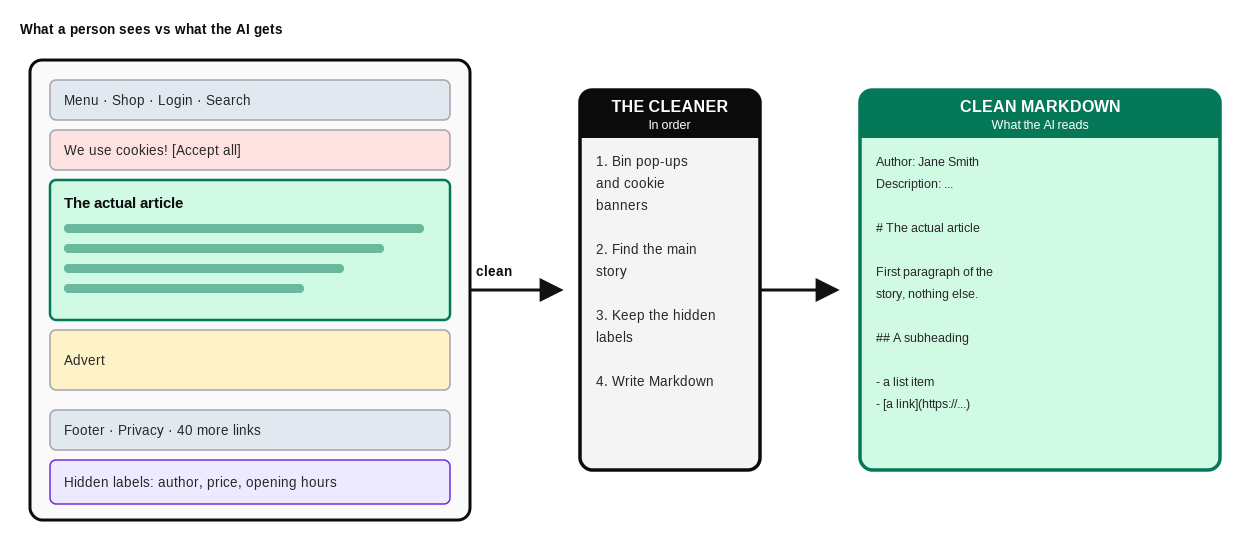
- Bin the pop-ups. Cookie banners and pop-up dialogs are removed first, so they never end up in the text.
- Find the main story. PageLode uses a “readability” tool, the same idea as the reader mode in your browser, to find the article and drop the menus, sidebars and footers.
- Don’t trust it blindly. Reader mode sometimes grabs too little, say one paragraph of a long page. If the “main story” covers less than half the page’s real text, PageLode keeps the whole cleaned page instead.
- Keep the hidden labels. Many sites include invisible tags for search engines: the author, the product price, the opening hours, a short description. PageLode pulls those out and puts them at the top.
- Write Markdown. The result is converted to Markdown: plain text with simple marks for headings, lists and links. It’s tidy for people and cheap for AI to read.
8. Putting it all together
Here’s the whole journey of a single web address:
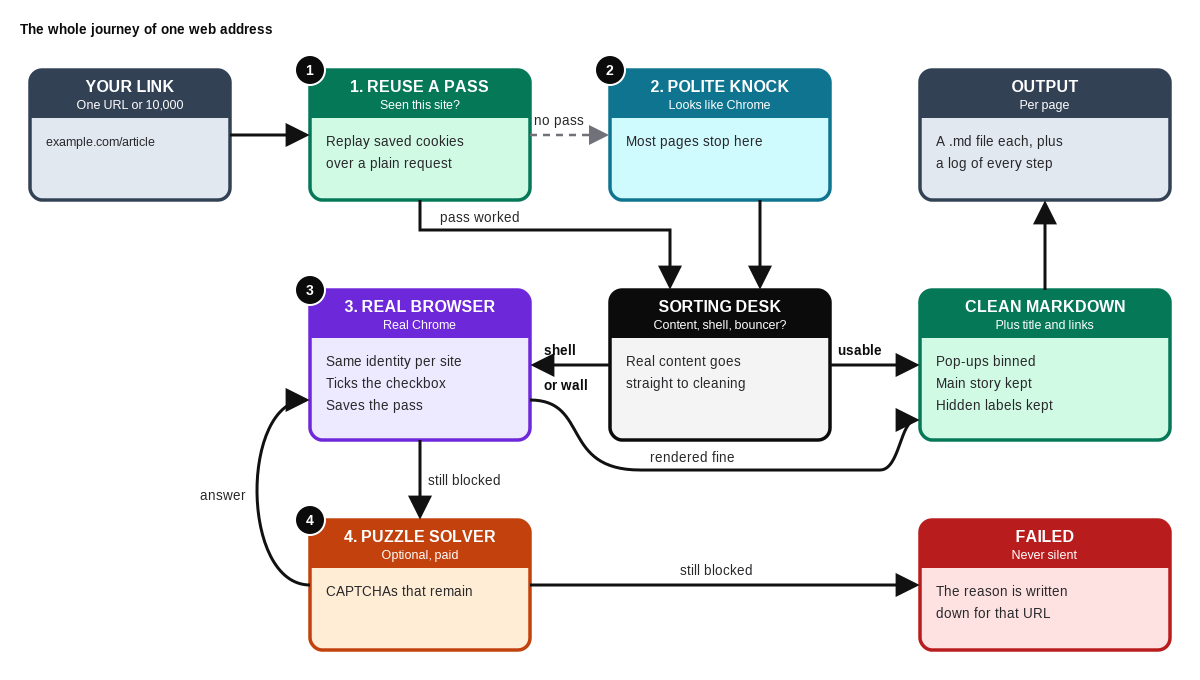
Give it ten thousand addresses and it runs twenty at a time by default. Each page becomes its own Markdown file, and a log records every address with the step that finally worked, how many tries it took, and the reason if it failed.
What I’d take from this
- Try the cheap thing first. Most of the web is easy. Build for the easy case and escalate only when a page proves it’s hard.
- Check what you got, not just whether you got something. A bouncer’s page and an empty shell both look like success to a naive tool. The sorting desk is the most important part of the engine.
- Remember what worked. Saved passes and remembered routes turn one expensive browser visit into hundreds of cheap ones.
- Clean before you feed the AI. The fewer menus and cookie banners an AI has to read, the better and cheaper its answers.
None of the individual pieces are new. Disguised requests, headless browsers, reader mode and Markdown converters have all been around for years. What makes PageLode work is the order it uses them in, and the fact that it checks every reply before trusting it.
Built on
- PageLode on GitHub
- go-readability, the reader-mode library
- html-to-markdown, the Markdown converter
- tls-client, the library behind the Chrome-shaped handshake
- Patchright, the browser automation used for real Chrome
- CapSolver, the optional puzzle solver