How Keenable turns a thousand web pages into one table, explained simply
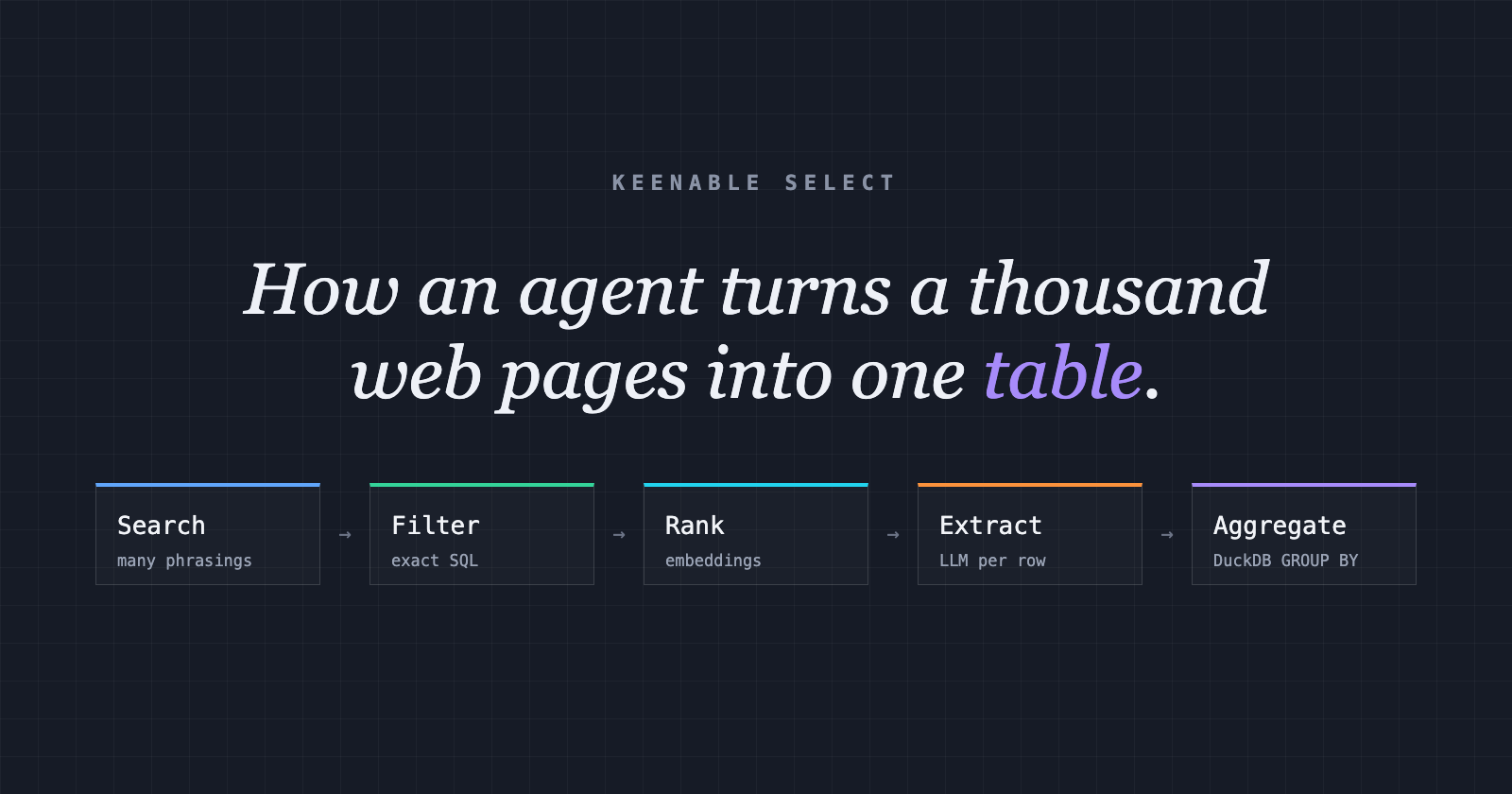
In my last post I took apart how Exa finds the right page in billions. That’s the classic shape of web search: a query goes in, ten good links come out.
Keenable is a newer search engine for agents that bets on a different shape. Its SELECT tool doesn’t return ten links. It returns a table, built from a thousand pages in a single call, with every row naming the page it came from.
So I read through Keenable’s docs, launch post and published agent runs to work out what happens in between. Like Exa, it turns out to be a handful of simple ideas stacked on top of each other.
By the end of this post you’ll know:
- The difference between a narrow question and a wide one
- How an agent can query the web with SQL
- What a “semantic operator” is
- Why the order SELECT runs things in keeps it affordable
- Whether it’s reading the live web or a database
One caveat before we start: SELECT launched in September 2026 and Keenable publishes far less about its internals than Exa does. Treat the specifics as a snapshot of how it works, not a spec, and I’ll flag what isn’t published as we go.
1. Narrow questions and wide questions
Think of two questions about apartments.
- “What does this apartment cost?” One answer, on one page. Find the listing and you’re done.
- “What do two-bedroom apartments in this neighbourhood actually rent for?” No single page holds that answer. It’s a property of every listing put together.
Keenable calls the second kind wide search. The answer is a distribution, not a fact.
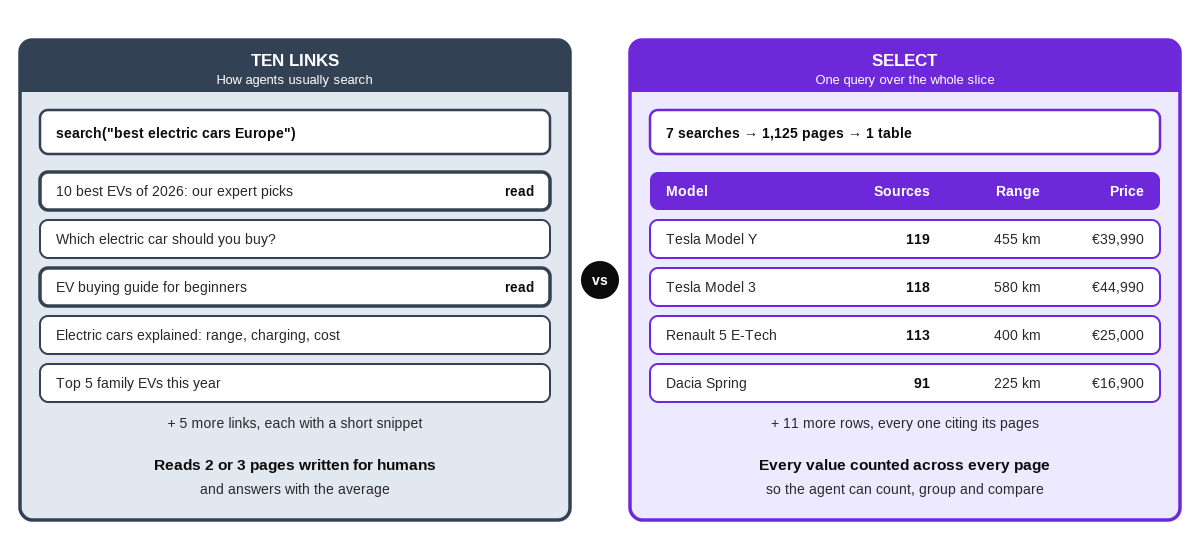
Why ten links struggle with wide questions:
- The agent searches once or twice and gets 10 to 20 links with short snippets
- It reads a few of those pages, if it reads any at all
- It answers from what it read, plus what the model already believed
The pages a normal search engine ranks highest are written for humans: guides, listicles, advice. So the agent ends up relaying the average answer. Keenable’s launch post puts it bluntly: it’s “correct in the way a horoscope is correct”.
What SELECT does instead:
- Reads over a thousand pages in one call
- Pulls the same fields out of every page
- Hands back a table, so the agent can count, group and compare
The agent stops reading the web and starts computing over it.
2. Treat the web like a database table
If the answer is a property of a set of pages, the natural tool is the one built for asking questions about sets: SQL.
SELECT is an MCP server with one main tool, select, that runs one read-only SQL query in the DuckDB dialect. The trick is that web pages show up as rows:
WEB_SEARCH('query 1', 'query 2', ...)runs every search at once, merges the results and removes repeated URLs. One row per page.WEB_FETCH('https://...')fetches specific pages as Markdown. One row per page.
Each row has the page’s url and its content, so everything after that is ordinary SQL.
You don’t write the SQL
This is the part that surprised me. You ask your agent a question in plain English, and the agent writes the query. The select tool ships its own full usage guide as its description, so the model learns the dialect the moment the tool is connected.
Here’s a real query from Keenable’s docs, for the question “which electric cars sold in Europe come up most often, and what are their range and starting price?”:
SELECT SEM_NORM(model, 'merge trim levels and battery variants into one model') AS model,
       COUNT(DISTINCT url) AS sources,
       MODE(range_km) AS range_km,
       MODE(price_eur) AS price_eur
FROM (
  SELECT url, UNNEST(
    SEM_EXTRACT_ALL(
      content,
      'an electric car model sold in Europe',
      model := 'brand and model name, e.g. "Renault 5 E-Tech"',
      range_km := 'WLTP range in km, number only',
      price_eur := 'starting price in EUR, number only'
    ),
    recursive := true
  )
  FROM WEB_SEARCH(
    'best electric cars Europe 2026 WLTP range price',
    'affordable EV Europe comparison starting price',
    'new electric car launches Europe 2026',
    'EV buyers guide range price Germany',
    'site:reddit.com which EV should I buy Europe',
    'electric car WLTP range comparison table',
    'cheapest electric cars Europe list'
  )
)
GROUP BY SEM_NORM(model, 'merge trim levels and battery variants into one model')
ORDER BY sources DESC
LIMIT 15
What that one call did:
- Ran 7 searches, worded differently on purpose
- Merged 1,400 results into 1,125 unique pages
- Pulled three fields out of every page
- Grouped them by car and returned 15 rows
The first few rows:
| Model | Sources | Range (km) | Price (EUR) |
|---|---|---|---|
| Tesla Model Y | 119 | 455 | 39,990 |
| Tesla Model 3 | 118 | 580 | 44,990 |
| Renault 5 E-Tech | 113 | 400 | 25,000 |
| Dacia Spring | 91 | 225 | 16,900 |
Notice the sources column. Each price isn’t one page’s claim, it’s the most common value across every page that mentioned the car. One outdated page can’t win on its own.
Why seven searches, not one
A single search only reaches the pages that one wording happens to match. The guide tells the agent to cast wide with genuinely different phrasings: buyer guides, comparison tables, launch news, Reddit threads. Each phrasing reaches a different corner of the web, and the URL dedup stops any page being counted twice.
3. Semantic operators: SQL functions with a model inside
Plain SQL can count and group, but it can’t read. content is just a wall of Markdown. You can’t write WHERE content = 'a frontier lab researcher changing jobs'.
That’s what semantic operators are for. They’re normal-looking SQL functions, except each one runs a model over the row.
| Operator | What it does | Cost |
|---|---|---|
SEM_EXTRACT(col, 'field') | Reads the page and returns one value, or null if it isn’t there | One LLM call |
SEM_EXTRACT_ALL(col, 'item', ...) | Returns every matching item on the page, as a list | One LLM call |
SEM_MATCH(col, 'predicate') | Yes or no: does this page fit the description? | One LLM call |
SEM_SCORE(col, 'query') | A similarity score from embeddings | Cheap |
SEM_NORM(col, 'rule') | Gives values that mean the same thing the same key | Not published |
Read it like this:
SEM_EXTRACTis a column you didn’t have. Price, date, founder, coordinates.SEM_MATCHis aWHEREclause by meaning. “Only pages about a named researcher moving between labs.”SEM_NORMis what makesGROUP BYwork on messy text. “Model 3 Long Range” and “Tesla Model 3” become one group.
The idea isn’t new to Keenable. It comes from database research: Stanford’s LOTUS project defined LLM-powered filters, maps and joins over tables, and Snowflake ships similar functions in its SQL engine. Keenable’s twist is that the table underneath isn’t a warehouse you already own. It’s a slice of the web, fetched by the same query that reasons over it.
4. Cheap first, expensive last
Here’s the problem. If SELECT ran an LLM over every page it fetched, a thousand-page query would mean a thousand model calls before it even started filtering.
The fix is the same one Exa uses: shortlist cheaply, judge expensively. SELECT just bakes it into how it runs your SQL.
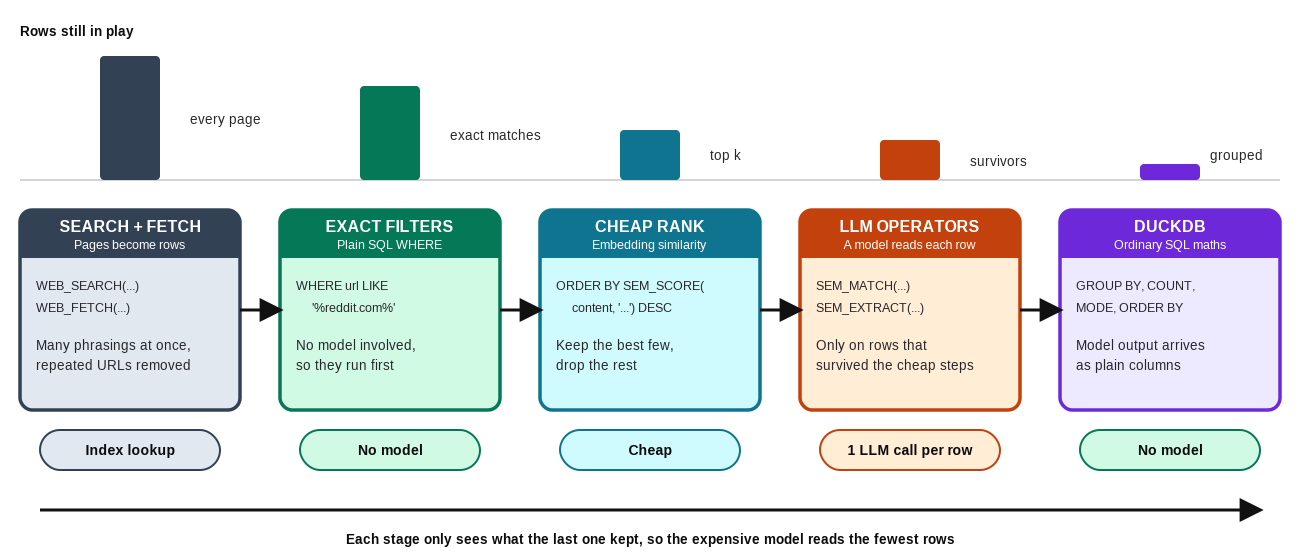
How a query runs:
- Parse the SQL and find the semantic operators inside it
- Search and fetch the pages, as rows
- Exact filters first. Plain
WHEREclauses (a domain, a keyword) need no model, so the engine runs them before any model is involved - Cheap ranking, when the query asks for it.
SEM_SCOREuses embeddings, so the agent can cut a pile down to the best few before any LLM reads them - LLM operators last, and only on the rows that survived
- Swap the results in as plain columns, then hand the whole thing to DuckDB for the ordinary SQL: grouping, counting, sorting
A worked example: picking one page out of five
Keenable publishes full agent runs, and one of them maps where famous Indian mango varieties come from. For each variety, the agent needed the map coordinates of its home town.
The naive version: search each town, then extract coordinates from all 5 results. That’s 5 LLM calls per variety.
What the agent actually wrote:
ROW_NUMBER() OVER (
  PARTITION BY s.variety
  ORDER BY SEM_SCORE(g.content, s.place || ' ' || s.state || ' geographic coordinates') DESC
) AS geo_rank
...
WHERE geo_rank = 1- Search each town and keep 5 pages
- Use
SEM_SCOREto rank those 5 pages by how well they match “this town’s coordinates” - Keep only the best one
- Run
SEM_EXTRACTon that single page
One LLM call per variety instead of five. The cheap embedding score picks the page, and the expensive model only reads the winner.
Searches can run per row too
That example hides another trick. The search wasn’t a fixed string, it was built from each row:
WEB_SEARCH(s.place || ' ' || s.state || ' latitude longitude coordinates India')So one query can say: for every row in this table, go and search for more about it. That’s how an agent fills in a column that no single page could give it.
5. Result sets: never pay for the same search twice
Every select call saves its output and returns a result set ID, like ra84968f0532.
A follow-up query can then read from that ID as if it were a table:
SELECT model, range_km, price_eur
FROM ra84968f0532
WHERE TRY_CAST(price_eur AS INTEGER) < 30000
ORDER BY TRY_CAST(range_km AS INTEGER) DESC- No new searching, no new fetching. It came back in seconds.
- The raw pages are kept as their own result set, so you can ask a completely different question of the same 1,125 pages.
- Result sets live for 30 days.
This changes how an agent works. The first query is the expensive crawl. Every refinement after that (“only under €30k”, “now by country”, “only 2026 launches”) is plain SQL over a table it already has.
6. Live web or database?
“Queries the live web” sounds like SELECT goes out and crawls a thousand websites on the spot. Mostly, it doesn’t.
At Keenable:
- Search reads Keenable’s own index. Keenable runs its own crawler, KeenableBot, and holds an index of over 100 billion pages. It doesn’t resell Google or Bing results. Its core systems are written in Rust.
- Every page carries the time it was crawled. The plain search API can filter on it, and can even search the index as it stood at a past moment.
- Keenable’s fetch tool returns its indexed copy by default. It has a
liveswitch to fetch straight from the source instead, including pages Keenable hasn’t indexed. - The models run on demand. The LLM and embedding work happens when your query runs, which is why a query takes seconds to minutes rather than milliseconds.
- Result sets are Keenable’s own storage, not the web at all.
So “live” means the search runs live. The pages themselves are as fresh as Keenable’s last crawl.
What Keenable hasn’t published: whether WEB_SEARCH rows inside SELECT always use the indexed copy, whether WEB_FETCH inside SELECT goes live, which LLM does the extraction, which model powers SEM_SCORE, or whether pages arrive already embedded. All we know is the shape: search the index, run the operators, hand the rows to DuckDB.
7. Putting it all together
Here’s the whole journey of one SELECT question:
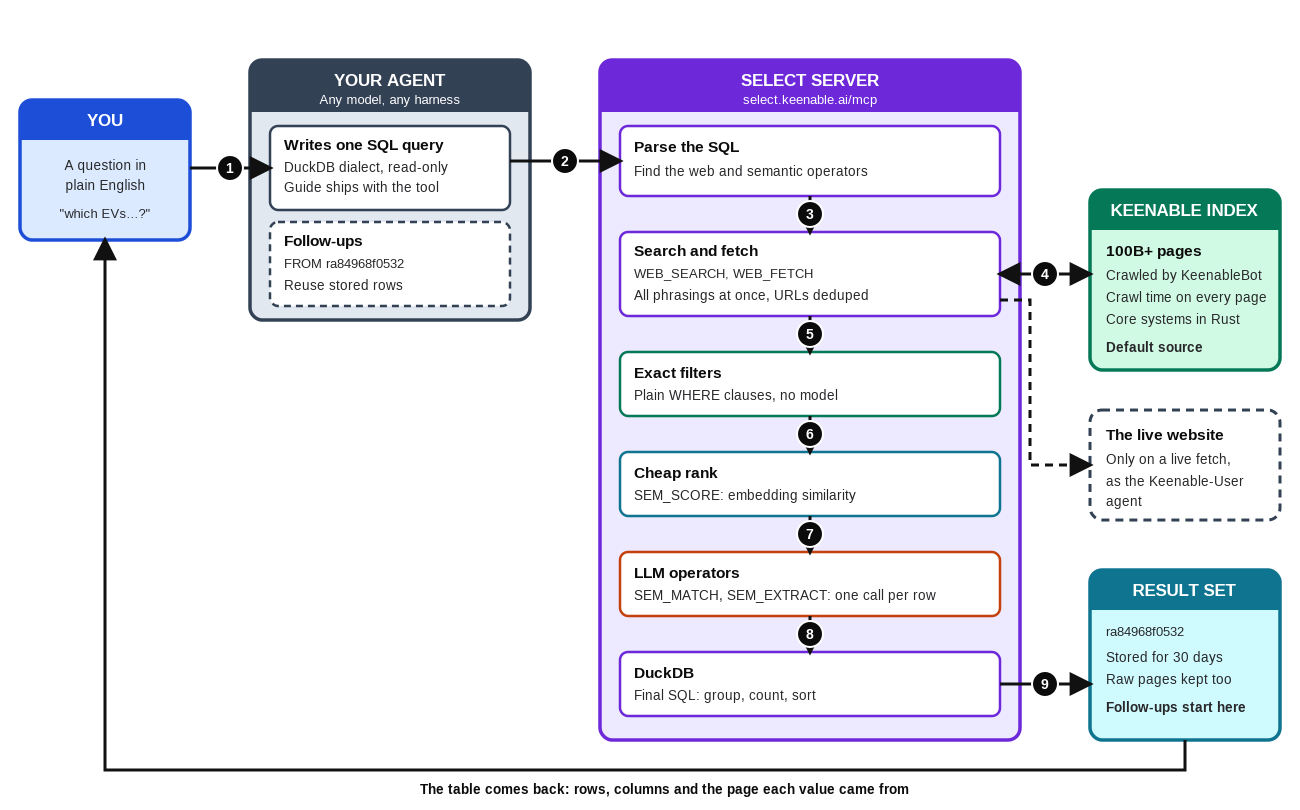
- You ask a question in plain English
- Your agent writes one SQL query, following the guide built into the tool
- The server parses it and pulls out the web and semantic operators
WEB_SEARCHruns every phrasing at once against Keenable’s index, then removes repeated URLs- Exact filters drop rows without a model
SEM_SCORE, if the query uses it, shortlists rows cheaply with embeddingsSEM_MATCHandSEM_EXTRACTread the survivors with an LLM, one call per row- DuckDB runs the final SQL: group, count, sort
- The table comes back with a result set ID, so follow-ups skip steps 4 to 7
When you ask for a write-up, a second agent on the server takes the result sets, loads them as dataframes in a sandboxed Python session and builds an HTML report. After each draft, the server screenshots the page and counts its JavaScript errors, and the agent fixes what it sees before the final link goes live.
How it compares to Exa
| Exa | Keenable SELECT | |
|---|---|---|
| Returns | Ranked pages | A table |
| Where the work is | Before the query: embedding the whole web | During the query: a model over every row |
| Best at | Finding the right page, fast | Questions whose answer is spread across pages |
| Speed | Under 200 ms | Seconds to minutes |
| Published internals | A lot: vector database, BM25, data pipeline | Very little beyond the query engine |
They’re not really competitors for the same job. Exa makes one search excellent. SELECT makes a thousand pages answerable in one go.
What I’d take from this
- Notice when your question is wide. If the honest answer is “it depends, across hundreds of examples”, ten links will hand you the average. A table hands you the spread.
- Shortlist cheaply, judge expensively, again. Exa does it with 1-bit vectors and SELECT does it with exact filters and embeddings before LLM calls. It’s the same idea, and it works in your own pipelines too.
- Agreement beats any single page.
COUNT(DISTINCT url)plusMODE()is a cheap way to ignore the odd wrong page. Still cross-check precise numbers: Keenable is clear that extraction reports what pages say, it doesn’t fact-check them. - You can build a small version yourself. DuckDB, a search API and a function that calls a model per row will get you surprisingly far on your own data.
- Store the expensive step. Result sets are the underrated part. Once the crawl is paid for, every follow-up question is almost free.
The thing that surprised me most is how ordinary the pieces are. SQL is fifty years old, DuckDB is a well-known embedded database, and semantic operators come straight out of database research. Keenable’s idea is to point all of it at a slice of the web and let the agent write the query.
Sources
- SELECT the tail FROM the web, Keenable, September 2026
- SELECT documentation, Keenable
- Keenable SELECT showcase and system overview, Keenable
- Showcase repository with full agent runs, Keenable
- MCP server documentation, Keenable
- Keenable crawlers, Keenable
- Member of Technical Staff, Engineering, Keenable
- LOTUS: semantic operators over tables, Stanford, 2024