How I get Google search results with one request, explained simply
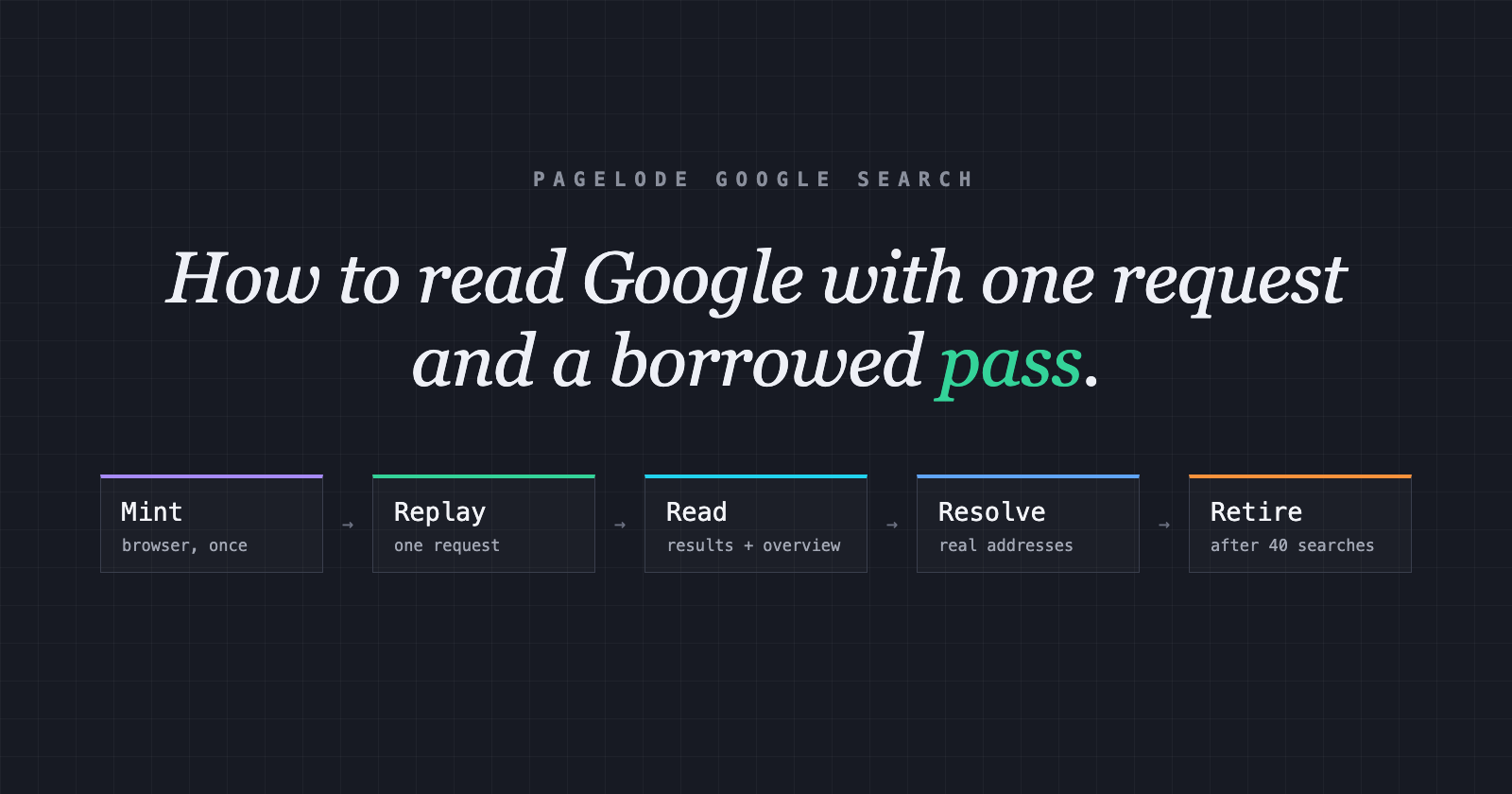
In my last few posts I took apart how Exa, Keenable and Parallel search the web for AI agents. This time it’s something I built myself.
PageLode is my open-source tool for turning web pages into clean text. One of its commands, pagelode google, runs a Google search and hands back the results: each result’s position, title, real web address and short description. Ask for it, and you also get Google’s AI Overview, the AI-written answer at the top of the page, with its sources.
The hard part is that Google really doesn’t want robots doing this. So here’s how it works, with no jargon left unexplained.
By the end of this post you’ll know:
- Why Google blocks robots, and the two ways it does it
- The “visitor pass” trick that makes most searches a single, cheap request
- Why every pass only works from one internet address
- How new passes get made, and how fast
- How PageLode reads the results and the hidden parts of the AI Overview
- How far the whole thing scales
One caveat before we start: every number here comes from my own measurements, and the Google command hasn’t been load-tested yet. Google also changes its pages often. Treat this as a snapshot, not a promise.
1. What you get
You type a search, just like you would into Google:
pagelode google best coffee london
pagelode google --ai-overview why is the sky blue
pagelode google --json --ai-overview 'how do tides work'
Or, if PageLode is running as a server, you send it the same thing over the web:
curl -sS http://localhost:8083/google -H 'content-type: application/json' -d '{"query":"how do tides work","aiOverview":true}'What comes back:
| Field | What it means |
|---|---|
query | What you searched for, with any extra spaces trimmed |
results | One entry per result: its position, title, web address and description |
aiOverview | Only when you ask: whether Google showed one, the answer as clean text, and its sources |
provider | replay if the search reused a saved visitor pass, patchright if it had to open a browser for a new one |
On the command line, you see the AI Overview first (if you asked for it), then a numbered list of results. If Google returned neither, the command reports a failure.
2. The problem: Google spots robots
When you search Google in Chrome, a lot happens that you never see. Your browser runs Google’s JavaScript (small programs inside the page) and carries cookies: small notes Google left on your computer earlier that say “I’ve seen this visitor before.”
A robot that just asks for the page without any of that gets caught in one of two ways:
- The JavaScript wall. Google sends back a page that only works if you run its JavaScript. A simple robot can’t, so it gets nothing useful.
- The
/sorrypage. Google decides the traffic from your internet address looks automated and sends you to a “sorry, unusual traffic” page with a CAPTCHA (one of those “click all the traffic lights” puzzles). Behind the scenes this is an “HTTP 429: too many requests” error.
That leaves two obvious options, and both are bad:
| A real browser for every search | A plain request for every search | |
|---|---|---|
| Gets results? | Yes | No: it hits the JavaScript wall |
| Speed and cost | Slow, and heavy on the computer | Fast and cheap |
PageLode does both. It uses a real browser once to get a visitor pass, then reuses that pass for fast, plain requests.
3. The visitor pass
Think of a festival wristband. You queue once at the gate, prove who you are, and get a wristband. After that you walk straight in every time.
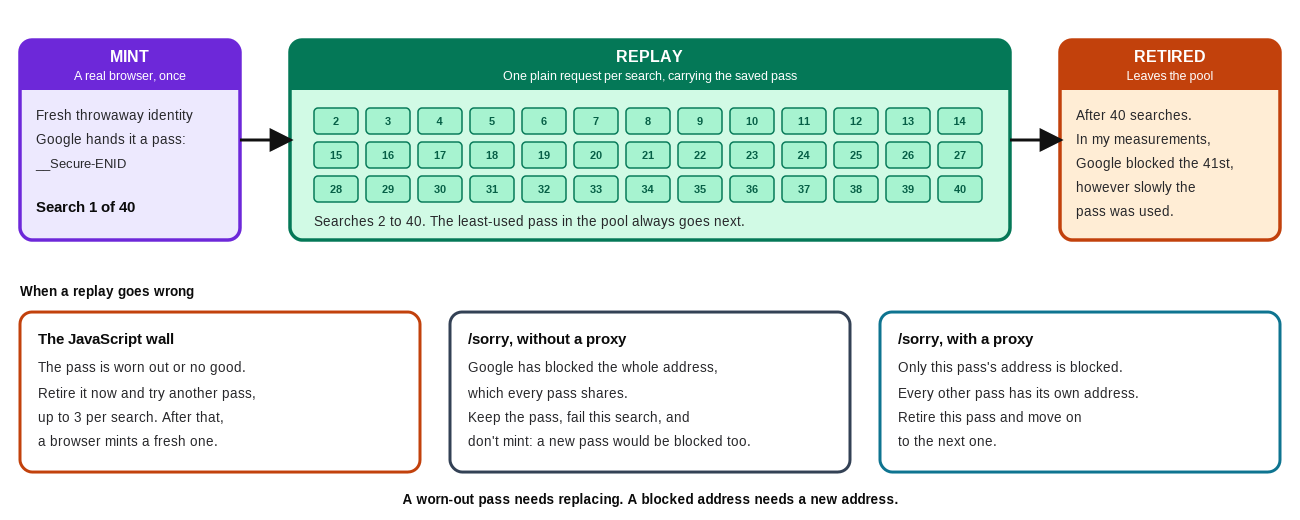
How the pass works:
- A real browser searches Google once. Google treats it as a normal visitor and hands it a cookie called
__Secure-ENID. That cookie is the wristband. - PageLode saves the cookie. It also saves the browser’s other details, like its headers (the extra information a browser sends with every request) and its user agent (the line that says “I’m Chrome on a Mac”).
- Later searches replay it. PageLode sends a single plain request to
google.com/search, carrying the saved cookie, using a tool called tls-client that makes the request look like it came from a real browser at a low level too.
The rules I found:
- Only a browser-made pass works. A cookie picked up through a plain request still gets the JavaScript wall. It has to come from a real browser search.
- Each pass is good for 40 searches. That includes the search that created it. In my measurements, Google blocked passes on their 41st search, no matter how slowly I used them. The limit is a setting (
PAGELODE_GOOGLE_COOKIE_SEARCHES, default 40). - The least-used pass goes first, so wear is spread evenly across all of them.
- A pass leaves the pool when it’s used 40 times, or as soon as it hits the JavaScript wall.
- Each search tries up to 3 passes. If all three fail, PageLode opens a browser and makes a fresh one.
- Passes say they last 395 days. How long Google really honours one that’s sitting unused, I haven’t measured yet.
4. Every pass belongs to one address
Every device on the internet sends its requests from an IP address, a bit like a home address for your connection. Google remembers which address a pass was handed to.
A pass only works from the address that got it. Use it from anywhere else and it’s useless.
That has two big consequences.
The bouncer blocks the address, not the pass
When Google shows the /sorry page, it’s the bouncer banning everyone coming from your address, not just one wristband.
- Without a proxy, every pass shares your computer’s one address. So if one search gets
/sorry, the others would too. PageLode fails that search, keeps the pass, and doesn’t bother making a new one, because a new one would be blocked as well. - With a proxy, each pass has its own address. A
/sorryonly retires that one pass, and the search moves on to the next.
Proxies give every pass its own address
A proxy is a middleman that sends your requests out from a different address. A mobile proxy uses addresses from real phone networks, which Google is much slower to block.
- Turn it on by setting
PAGELODE_PROXY_URL. If that address contains a placeholder for a session, each new browser gets its own session, which means its own outgoing address. - Every pass remembers its exact proxy, and later searches with that pass go out through the same one.
- Passes don’t mix. A copy of PageLode running with a proxy only uses passes made through a proxy, and one running without only uses passes made directly. Both kinds can live in the same storage.
- Without a proxy, PageLode and the browser must share an address. On one machine they do automatically.
Two more tricks for staying unblocked
- CAPTCHAs get solved. If Google shows
/sorrywhile a browser is making a pass, a paid service called CapSolver solves the puzzle, as long asCAPSOLVER_API_KEYis set. PageLode does the same for any other page it loads. - The browser never admits it’s hidden. Running Chrome without a visible window (“headless”) makes it announce itself as
HeadlessChrome, and Google sends that straight to/sorry. So withBROWSER_SERVICE_HEADLESS=true, the browser borrows the user agent of a normal, visible Chrome.
5. Making new passes
Making a pass is called minting. Each one is made in a brand new, throwaway browser identity with a random name like once-x7k2, which is deleted straight after. That guarantees a new pass every time instead of the same one twice.
You can stock up ahead of time:
pagelode google --fill-pool 100What that does:
- Runs several browser searches at once (as many as
--workerssays) - Keeps going until there are 100 usable passes in storage
- Stops early after 30 failed attempts in a row, 5 seconds apart (change it with
--stop-after-failures). A run of failures usually means the browser has crashed or Google has started blocking the address.
A pool of 100 passes covers about 40 × 100 = 4,000 searches.
How fast minting goes, from my measurements:
| Setup | Result |
|---|---|
| One home address, 70 to 90 passes a minute | Google showed /sorry after about 340 passes |
| Evomi mobile proxies, 12 browsers at once | About 31 passes a minute, with 43% of attempts succeeding |
So from a single address, mint slowly, or spread the work across many proxy sessions.
6. Where the passes are kept
With a database (set PAGELODE_DATABASE_URL), passes live in a table called pagelode.google_cookies. For each pass it records:
- The saved browser session: cookies, headers, user agent and proxy
- How many searches it has done
- When it was made and when it was last used
- When it got blocked, if it did
Every running copy of PageLode loads the usable passes when it starts, and updates the count after every search. That means several copies can share one pool.
Without a database, passes only last as long as the program is running. A one-off search from the command line therefore always has to open a browser and mint, which is much slower.
7. Reading the page
Getting the page is half the job. The other half is pulling clean answers out of it.
The results
PageLode only keeps the ordinary results, the ones Google calls “organic”:
- It looks in the main results area of the page (Google labels it
#rso) for links with a headline inside them - It keeps them in page order, and ignores anything inside the AI Overview
- It skips links back to Google itself, like related searches and help pages, and any address it has already seen
- For the description, it takes the longest block of description text in the result and trims Google’s “Read more” off the end
- Ads and “People also ask” aren’t results, so they’re left out
The real web addresses
Google doesn’t link straight to websites. It uses its own redirect links that look like https://www.google.com/goto?url=…. Visit one and Google forwards you to the real site.
So PageLode visits every one of these links once, 8 at a time, and writes down where each one leads. It does this through the same proxy, but without the visitor pass, so these lookups don’t use up any of the pass’s 40 searches. If a link can’t be followed, it’s left as the Google link.
The AI Overview
This is the fiddliest part. Google only sends the first few sections of the AI Overview as normal page content. The rest is hidden inside scripts on the same page, waiting to fill empty slots once Google’s JavaScript runs.
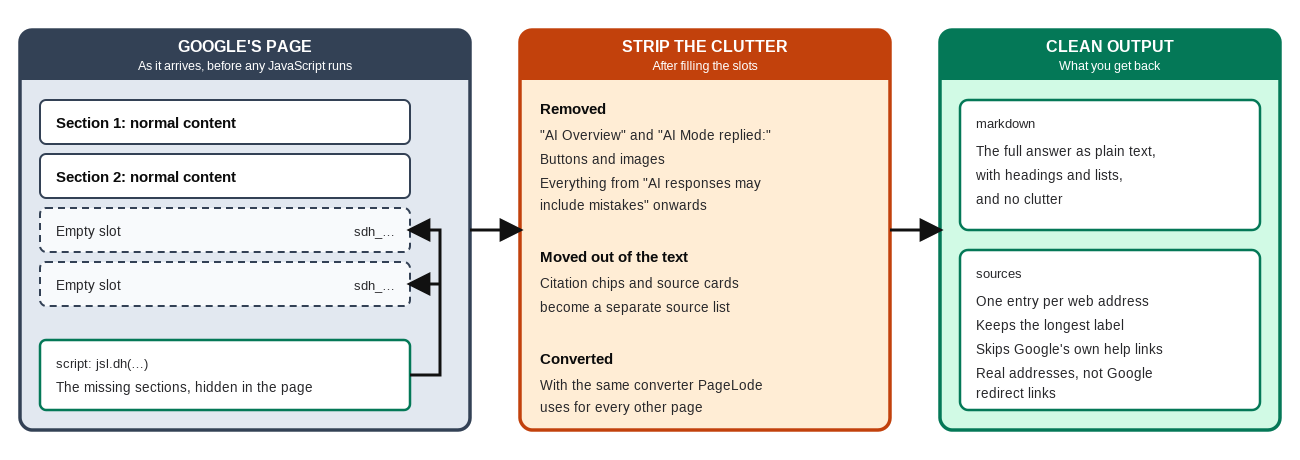
PageLode doesn’t run that JavaScript. Instead it:
- Finds the overview on the page, by its “AI Overview” heading
- Fills the empty slots itself, using the hidden content in the same page (inside scripts called
jsl.dh) - Strips the clutter: the “AI Overview” and “AI Mode replied:” headings, buttons, images, and everything from the “AI responses may include mistakes” notice onwards
- Pulls out the sources: it removes the little citation chips and source cards from the text and lists their links separately, one per web address, keeping the longest label and skipping Google’s own help pages
- Turns the rest into Markdown, a simple text format with headings and lists, using the same converter PageLode uses for any other page
One limit: PageLode always searches in English (hl=en). In other languages, Google’s labels change and PageLode wouldn’t recognise them.
8. Putting it all together
Here’s the whole journey of one search:
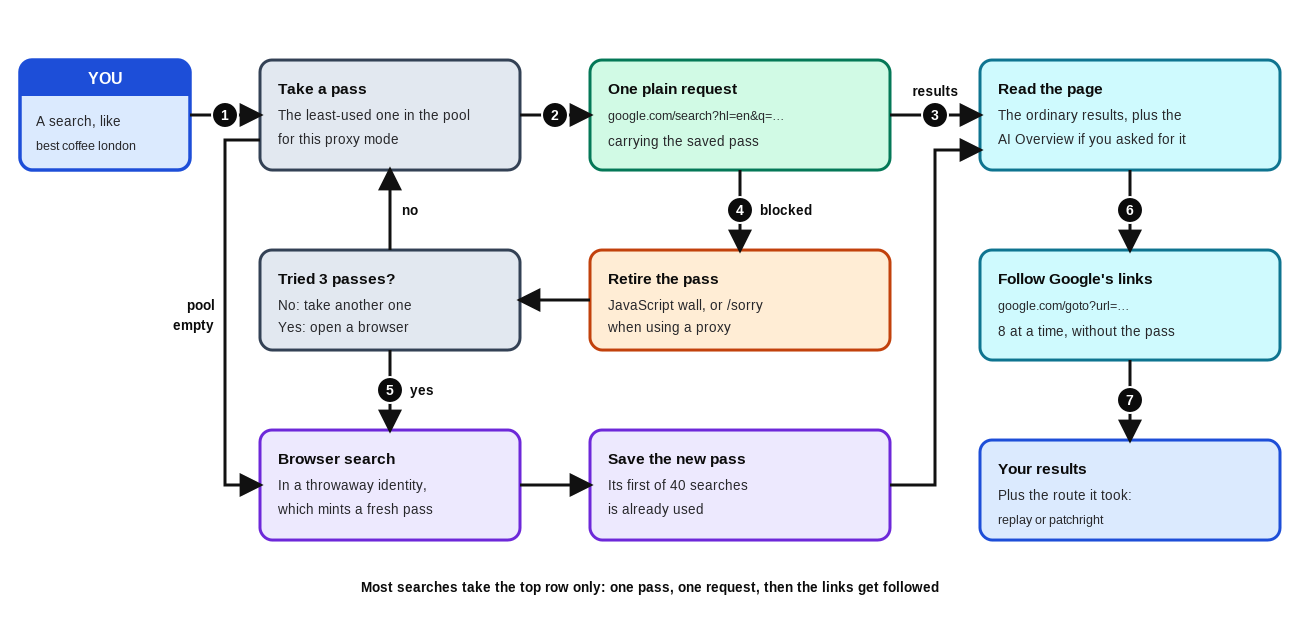
- You search for something
- PageLode takes the least-used pass from the pool and sends one plain request to Google with it
- If Google returns results, it reads them, and the AI Overview if you asked
- If Google blocks it, that pass is retired and PageLode tries another, up to 3
- If there are no passes left, or 3 failed, a throwaway browser searches instead and mints a new pass, which counts as its first search
- Every Google redirect link is followed to the real website, 8 at a time
- You get the results, plus which route was used:
replayorpatchright
If something goes wrong on the server, you get one of these:
| Error | What happened |
|---|---|
| 400 | The request wasn’t a single search with some text in it |
| 408 | The search took too long (PAGELODE_REQUEST_TIMEOUT) |
| 429 | PageLode is too busy right now: its queue is full |
| 502 | The browser search was blocked, or the browser service failed |
9. How far it scales
These are estimates from my measurements, not a load test.
| What | Number | What it means |
|---|---|---|
| One search | About 0.8 to 1.6 seconds, including following the links | Each slot handles about 1 search a second. Mobile proxies are probably slower |
| Searches at once | 20 per copy of PageLode (PAGELODE_MAX_CONCURRENCY) | About 13 to 20 searches a second per copy. Run more copies on one database for more |
| Passes used up | 40 searches each | At 10 searches a second you burn through about 900 passes an hour |
| Making passes | About 31 a minute on mobile proxies, or about 300 from one address before /sorry | Enough to keep up roughly 20 searches a second. A stocked pool can go faster until it runs dry |
| Storage | About 1.6 KB per pass | 100,000 passes is about 165 MB, and every copy loads them all at start |
| Data | About 1 MB per results page | 10 searches a second is about 36 GB an hour through the proxy |
| How long passes live | They say 395 days, but the proxy address may change sooner | The real limit is how many you can use before their addresses change. Not measured yet |
The short version:
- With proxies, every pass has its own address, so you can keep adding passes. The limit becomes how fast you can make them, how much proxy data you can pay for, or how long they last.
- Without a proxy, everything shares one address, and however much Google will tolerate from that address is your ceiling.
- One pass used every 3 seconds, or every 15 seconds, was fine. Faster than that from a single pass, I haven’t tested.
What I’d take from this
- Pay the expensive cost once. A real browser is slow, so use it only to get the pass, then reuse the pass with cheap requests. It’s the same “do the expensive thing rarely” idea behind Exa, Keenable and Parallel.
- Find out what’s actually being checked. Most of this design came from measuring: which cookie matters, that the 41st search fails, that
/sorryis about the address and not the pass. - Match the fix to the block. A worn-out pass needs replacing. A blocked address needs a new address. Mixing those up wastes passes.
- Don’t run the page’s code if you can read it instead. The AI Overview’s “hidden” content was in the page all along.
- Measure before you scale. Bandwidth (36 GB an hour) and pass turnover (900 an hour) bite long before raw speed does.
The thing that surprised me most is how ordinary the trick is. There’s no clever hacking: just a wristband, a matching address, and knowing when the wristband has worn out.
Try it yourself
PageLode is open source. The code, setup instructions and the full technical docs are on GitHub:
github.com/simonbalfe/pagelode
- Google search docs: the technical version of this post
- Cookie pool measurements: the numbers behind the 40-search limit and minting speeds